
Help
Messages
Section titled “Messages”“Select a movement, or one of its parts, first” : A Time button’s tooltip when nothing of a movement is selected. Click any part of the movement in the viewport or the Outliner.
“Switch to Object Mode to add a movement” : Add Movement builds objects, which Blender allows only in Object Mode. Press Tab until the header says Object Mode.
“Make Real froze this movement …” : The movement is plain objects now and no longer ticks. Press Ctrl+Z to undo Make Real, change what you need, then click Make Real again.
“This movement plays from its baked keys …” : After Bake for Export the movement plays its keys, not its settings. Undo the bake, change the time or the frame range, then bake again.
“This movement is linked from another file: open that file to change it” : The movement comes from a linked library. Open the file it lives in, change it there and save.
“Nothing was added: … Pick another setting above and click Add Movement again” : The settings ask for a movement that cannot work, such as a layout with no room for a pillar. The message says what failed. Change it and click Add Movement.
”… stays as it was: … Its settings are back as they were” : In the status bar, after a change to a selected movement that could not be built. TockPilot left the movement and its settings as they were. Pick another value.
”… failed (…). Use Report a Problem …” : Something went wrong inside TockPilot. Your scene is as it was before you clicked. Send a report as below, so it can be fixed.
Questions
Section titled “Questions”Does the file tick without TockPilot? : Yes. The parts move on simple drivers that Blender runs by itself, also with Auto Run Python Scripts off. You need TockPilot only to change the settings.
Can I render a movement in Cycles and EEVEE? : Yes. The materials use Blender’s standard shader nodes, which both engines render.
How do I export it to a game engine or another program? : Set the frame range, select the movement and click Bake for Export. Then export to glTF or FBX with Blender’s own exporters. See Time.
Can I change a part by hand? : Click Make Real first, so the part is a plain object. On a live movement, TockPilot rebuilds its own parts when you change a setting, and your edits to them would be lost. Objects of your own that you parent to the movement stay.
Which Blender versions does it work with? : Blender 4.5 and newer, on Windows, macOS (Apple silicon) and Linux.
Escapement : The part that lets the train turn one tooth at a time: the escape wheel and the anchor or lever.
Train : The wheels that carry the power from the barrel or weight to the escapement.
Balance : A watch’s wheel that swings back and forth on its hairspring and sets the beat.
Beat : One swing of the pendulum or balance, one tick.
Bridge and plate : The flat metal parts that hold the wheels’ pivots.
Tourbillon : A cage that carries the escapement and balance round once a minute.
Report a Problem
Section titled “Report a Problem”If something does not work as this site says, tell me from inside Blender. Click the ? at the top right of the Movement panel and pick Report a Problem. It is also in Blender’s Help menu and in TockPilot’s entry under Edit > Preferences > Add-ons.
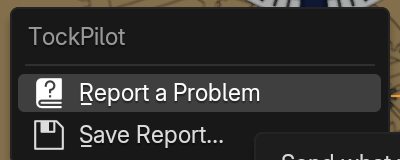
Write what you did and what you expected, add your email address if you want an answer, and click Send. The status bar shows the report’s name, such as TP-7F3K. The report holds the versions, the movement’s settings, the render settings and the last error. Your home folder is shortened to ~ in it. The privacy policy says where it goes.
With Allow Online Access off in Edit > Preferences > System, TockPilot cannot send. Pick Save Report instead and email the zip to the address in the imprint.
Licence
Section titled “Licence”TockPilot is free software under the GNU General Public License, version 3 or later.